

Reading time: 3 – 4 minutes

We all know how painful it is to keep up to date with our meeting and
obligations. I’ve recently been thinking of a nice way to sync my calendars
from work and personal into a single account.
I then had a very specific spec for it, which is as follows:

  • I need to get my calendar pushed to my iPhone;
  • The calendar must be a merge of my personal calendar, and my business
    calendar;
  • I still want to be able to pick up my google mail emails;
  • I DO NOT want it to pick up my business emails (as I prefer to
    pick them up another way);
  • The calendar must be available anywhere and at anytime

Obviously Google Calendar springs to mind, as we
all know it’s online, and basically that pretty much makes sure you have your
calendar anywhere (as long as you have internet connection). It takes the last
item off my list, as it’s available anywhere, but i still had to work on the
other three items, and here’s what I did:
First of all, you need to make sure you iPhone software is at least on
version 2.2, otherwise this won’t work.
I the downloaded Google Calendar Sync and
installed it. It’s very straoght forward, as you only need to put your account
details into it, and say what kind of sync you wanna have.
In my case, I chose 1-way: Microsoft Outlook Calendar to google
Calendar.
this pretty much tells your MS Outlook Calendar to synch with
Google Calendar every x minutes.
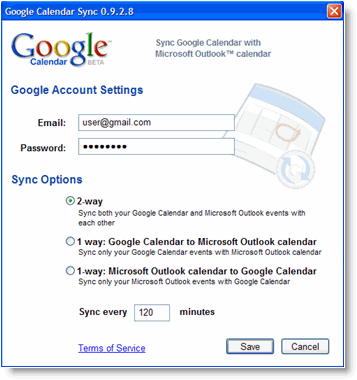
Google Calendar Sync
I then checked my Google Calendar, and everything was there. Excellent, I
just had to make it sync with my iPhone’s Calendar.
I then found some information over at Google’s website. I’ll describe the
next steps here

  • Open Settings on your iphone;
  • Open Mail, Contacts, Calendars.;
  • Tap Add Account;
  • Select Microsoft Exchange;
  • Put an account name in the email field (not your actual google
    mail email);
  • Don’t put anything on domain;
  • put your google mail’s email address on username;
  • put your password (in the password field);
  • Click next;
  • A server field will appear;
  • Enter m.google.com;
  • Click next and sync;

Make sure you select only calendars, as you have your email account already
configured.
And that should be it. in case you have different calendars in different
computers, you can simply follow the same steps of installation for each
computer, and your iPhone settings should remain the same, as everything comes
from Google Calendar.
source: Google Mobile Sync

28 Responses to “Sync your iPhone with Outlook (or Google) Calendar”

  1. akima says:

    This is very helpful. I can’t download iTunes on my work computer and this was an easy way around that. Thanks!

  2. Marcos Placona says:

    Glad it helped you :-)

  3. Doive says:

    It works it works! Was using my iphone with calendar directly synched to my work Outlook calendar, until my IT department blew a fuse and blocked access (security huh?). This will end months of missed meetings and appointments… Thank you very much for this – I have forwarded it on to all my iphone equipped colleagues.

  4. Marcos Placona says:

    Awesome, I’m really glad to have helped!

  5. DefiningSound says:

    This worked perfectly, thanks for the instructions. Now my work calendar syncs one-way with my google calendar, so I can easily sync the work schedule onto my iPhone. I suppose I could set it up for 2-way sync if I ever want to push calendar entries back to the work calendar, but for now I’ll try it as-is and try to do my scheduling while I’m at work.

  6. Marcos Placona says:

    Cool let me know how it goes then. Cheers

  7. Emma says:

    This is completely brilliant!! Thanks so much for your help, your instructions were great and simple to follow and now I don’t have to duplicate everything by typing into my iPhone manually.

    Lifesaver :D

  8. Marcos Placona says:

    Really glad it helped you Emma

  9. Carm says:

    woooo… This worked perfectly! I really missed that about my BB that i couldnt sync my outlook w my iphone but now i can. Thx so much!

  10. Marcos Placona says:

    Glad it worked for you!

  11. Jim says:

    Do you know about htc phones and the windows calendar? The HTC sync programme asks if you want to sync with Outlook or Windows, I chose windows, it says its synchronising and but I then discover it hasn’t touched either calendar. The sync options and settings in Windows vista are comprehensive but only relate to media synychronising. I have found where the windows calendar file is lurking in the PC but the media sync options only let you select music, pictures etc. Bring back Windows 3.1!

    I even opened a Google calendar but that will only sync with Outlook it seems, and isn’t an option on the HTC sync programme.

  12. Marcos Placona says:

    I don’t know, sorry. I’ve only done it through outlook and google calendars.

  13. Moontraxx says:

    I was getting really frustrated because the Windows calender sync (I downloaded and installed it) just wasn’t working. I downloaded this one and followed the steps and – voilĂ ! Thankxx

  14. Marcos Placona says:

    Glad it worked for you.

  15. Maryam says:

    I loved your instructions, they were great. Couple of questions though, I just added something to my calendar at work and it has not yet been updated on my iphone. what am i doing wrong?

    my second questions is OK now I have google calendar, outlook calendar at work and my iphone calendar. I am at a doctor’s office and enter my next appointment on my iphone, how do i get it on my google calendar or my work calendar?

    please help me…

  16. Cory says:

    works really well, but note that it only syncs your local calendar and not shared calendars nor sharepoint calendars.

  17. Marcos Placona says:

    Thanks for your comment and for clarifying that Cory.

    Cheers

  18. Ona says:

    Thanks very much for this Marcos. It has been driving me crazy, not having my calendar on my phone and having to resort to paper.

  19. Marcos Placona says:

    Glad to be of help

  20. g says:

    excellent instructions, you should consider writing the manual for Apple, more user friendly.

    anyway, so there is no way to sync my outlook calendar to my iphone without having to upload my outlook calendar to google calendar? thanks again.

  21. Rich says:

    Hi, Marcos:

    Sorry to be so obtuse, but now that I’ve followed your instructions, how do I actually start the sync? Does it do it automatically? If so, do I have to turn on Wi-Fi permanently or does it work some other way? Please advise.

  22. Marcos Placona says:

    Hi, it should just start automatically, be it in wifi or 3g

  23. Laura says:

    I’m executive assistant… I have my personal iCal (syncs to my iPhone) at home on my mac and then my Outlook and (we all share calendars) so I want/need to have my bosses calendar handy as well. I have admin privileges to his calendar… Will I be able to sync/push those two outlooks to my iphone?

  24. Marcos Placona says:

    I’d try and sync those with Google Calendar, that will allow you to have as many calendars as you want, and will sync with iCal and your iPhone.

  25. Adam says:

    Hi,
    I have set up as per your instructions. The sync works fine when I add someting on my PC into google calendar, but if I add something on my iPhone calendar it doesn’t sync to Google calendar on my PC?
    Google calendar on PC to iPhone sync = OK
    iPhone to Google calendar sync = not OK

    Any suggestiions?

  26. STACY says:

    I NEED IT TO WORK WITH MY OUTLOOK CALENDAR,CAN IT???

  27. STACY says:

    yay, it DID totally work, thank you!!!

  28. John says:

    Hello,

    I did everything you described and I have a new account in my iphone, but it doesn’t sync. The calendar is still empty. When is the sync suppose to start? I can see my outlook calendar in my google calendar but not in iphone..

    thanks in advance!
    John

Leave a Reply

You can use these tags: <a href="" title=""> <abbr title=""> <acronym title=""> <b> <blockquote cite=""> <cite> <code> <del datetime=""> <em> <i> <q cite=""> <strike> <strong>